
AI for legal work
Download Agatha
AI agent application that analyzes legal documents and surfaces clauses, risks, and deadlines—fast.
Choose your platform
Version: v2.1.6
System Requirements: Windows 10+ (64-bit) or macOS 10.15+ • 4GB RAM • 1GB disk space
Frequently asked questions
How can I upload documents?
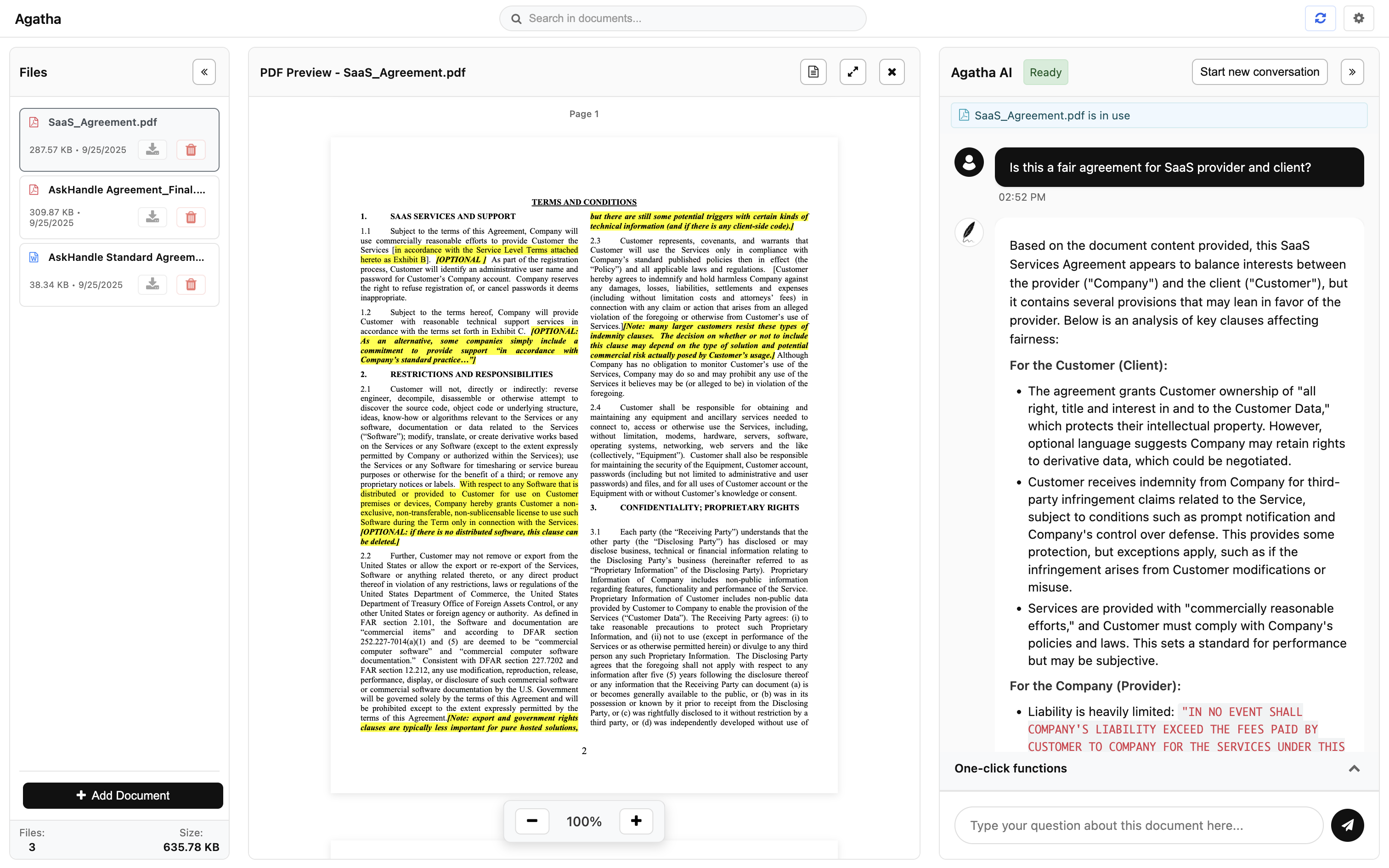
To upload files, click the “+ Add Document” button at the bottom left. An “Upload Document window will open, where you can either drag your document into the window or click “Choose Documents" to select the document you want to upload.
Can I upload formats other than PDF and Docx?
No. Agatha currently only supports PDF and Docx documents. We will support other formats in the future.
How can I delete my conversation?
You can click the "+" button and create a new conversation. The software will automatically delete the previous conversation.
How can I delete a document I uploaded?
To delete a document, click the Trash icon next to the file you want to remove. Your uploaded documents are listed in the first column (Files column).
What can I ask the AI?
You can ask or instruct the AI anything related to the document you are working on. For example:
• Explain a section
• Summarize text
• Highlight favorable clauses for a specific party
• Write or edit clauses based on your instructions
• And more…
• Explain a section
• Summarize text
• Highlight favorable clauses for a specific party
• Write or edit clauses based on your instructions
• And more…
Does the way I phrase my instructions or questions affect the AI's outcome?
Yes. The more specific your question or instruction, the more precise the AI's output will be. Be clear and direct about what you want the AI to accomplish, and test with different phrasing to get the best results.
What does the One-click function mean, and what happens when I click it?
The One-click function is a preconfigured feature that automatically analyzes your document and highlights favorable clauses for both landlord and tenant.
Best practice: use the function when starting a new, blank conversation. If you already have a conversation open, the AI's instructions will combine with your conversation history, which may affect results. Experiment to see how it performs.
Best practice: use the function when starting a new, blank conversation. If you already have a conversation open, the AI's instructions will combine with your conversation history, which may affect results. Experiment to see how it performs.
What can I do if the app is not working properly?
If something in the app isn't working, refresh it by clicking the Refresh button in the top-right corner.
Do you support documents in different languages?
Yes. We currently support 13 languages: English, Chinese (Traditional), Chinese (Simplified), French, Italian, Spanish, Portuguese, Croatian, Japanese, Korean, Russian, German, and Dutch.
Do you support document search?
Yes. To search for specific keywords or text, use the search bar at the top center of the app.
Can I expand the app window?
Yes. To maximize the app window, click the Maximize button (the second button to the right of the AI Status field). To minimize it again, click the same button.
Can I choose which Large Language Model to use?
Yes. Go to Settings and choose your preferred Large Language Model. You can select between OpenAI and DeepSeek.